13.5.12

Australians offered digital inbox for real mail | Delimiter

Australians offered digital inbox for real mail | Delimiter

News, Startups - Written by on Friday, March 16, 2012 9:16 - 7 Comments

Australians offered digital inbox for real mail


news

A trio of business process companies have teamed up in a joint venture to offer Australians an easy way to receive their physical mail — online.

Australia’s first digital postal service – Digital Post Australia – a joint venture between Computershare Limited, SALMAT and Zumbox, would be available to all consumers across Australia later this year, according to a media release issued by the company this week. The company plans that Australians will soon be able to receive postal mail online, compatible across major mobile platforms including iPhone, iPad and Android devices.


Independent research highlighted by the organisation has revealed more than 50 per cent of Australians found the idea of a digital postal service appealing, with the idea that it would be a secure, consumer-friendly service that offered the facility of receiving, storing and organizing important mail.

Digital Post Australia aims to ensure that every Australian had access to a secure, online digital postbox where physical mail would be made available digitally, in one central location online. Users would receive their bills, notices and statements online, through a single, secure channel, eliminating the need for multiple logins and passwords. The system acts as a personal assistant and notified users when payments were due. Documents were organised in a single digital vault where they could be stored, tagged and searched for. David Hynes, Chairman of Digital Post.

Australia observed: “Digital Post Australia will transform the way we receive and organise all our essential communications. We are taking one of the oldest forms of communication and making it more relevant to today’s marketplace. The Australian consumer is ready for the next generation of mail delivery and the benefits it will bring will be significant and widespread for both consumers and business.”

The digital postal mail platform is a closed system, accessible only to verified mailers and individually verified consumers linked to a physical mailing address. Thus, companies utilising the service would be assured of secure delivery of their communications to the correct recipient, and users could be certain that only they had access to their digital postbox.

Service providers including financial and government organisations would be connected to every household through the Internet. The secure and cost-effective customer channel they used would deliver per-piece cost savings between 50 and 70 per cent to the user. Further, Australian businesses would have a flexible and direct communications channel with their customers. Digital Post Australia emphasized that the digital postal service, with its security and privacy measures in place, eliminated problems of spam, phishing and fraud.

A bit about the partners: Computershare is renowned for its expertise in high integrity data management, high volume transaction processing and reconciliations, payments and stakeholder engagement; SALMAT is Australia’s leading marketing and communications company that delivers multichannel communication solutions; and Zumbox, located in Los Angeles, California is known for its digital postal mail technology platform that connects large transactional, financial and government mailers to consumer households, via the Internet.

opinion/analysis

Australia has needed a service like this for a while, and while there have been startups who have attempted to tackle this area before, none have really gotten that far with the idea. However, I believe Computershare and SALMAT, with their obvious existing strengths in this area, definitelu have the ability to make the idea of digital postboxes a reality. In addition, it looks like Zumbox has already been fairly successful with this technology internationally. Bringing it to Australia through existing partners with strengths in business processing and contacts all throughout the corporate sectors would seem to be a natural next step.

In addition, I personally really want this service. I operate a PO Box for my business, and it really bugs me that some companies just won’t communicate with me electronically. Every day I have to walk up to the main street and check my physical mail I have tried to get my bank to send me only electronic statements several times now, for example — but to no avail. They are chronically addicted to paper, and we need an organisation like Digital Post Australia to cure them of it.

Opinion/analysis by Renai LeMay

Related posts:
  1. Australia Post reveals digital mailbox plan
  2. Australia Post sues digital rival over name similarity
  3. Opera buys Aussie e-mail service FastMail.FM
  4. Budget 2011: Pensioners get free digital TV
  5. 95Mbps may be the NBN’s real-world limit

10.5.12

Lion DiskMaker 1.6.3 Utility Software Review | Macworld

Lion DiskMaker 1.6.3 Utility Software Review | Macworld

Macworld Rating
3.5 out of 5 Mice, May 8, 2012

Software Details
  • Guillaume Gète
  • OS X 10.6 or later
  • Universal
  • Payment requested
Do you like this product? YES24 NO1
Already own it? Write a Review »

Lion DiskMaker makes it easier to create a bootable Lion installer

I’ve written quite a bit about installing Lion (OS X 10.7) and about the benefits of creating a bootable installer disc or drive. While the latter process isn’t prohibitively difficult, it’s still a bit of a hassle. Developer Guillaume Gète has made it a bit easier with Lion DiskMaker, an AppleScript-based utility that mostly automates the procedure.

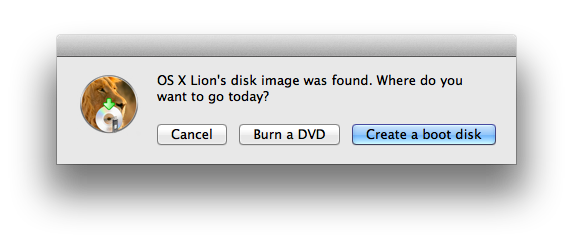
Launch Lion DiskMaker, and it checks your Applications folder for a copy of the Lion installer app. Assuming it finds the installer in that location, Lion DiskMaker then asks if you want to create an installer DVD or a boot disk, with the latter meaning a flash drive or an external hard drive.

Choose Burn A DVD, and you’re prompted to insert a blank, 4.7GB (single-layer) DVD. Unfortunately, you don’t see a progress bar while the disc is being burned—the DVD is simply ejected when it’s finished. On my 2010 iMac, it took about 17 minutes to burn the disc. You can boot from the DVD by inserting it into your Mac, restarting, and holding down the C key at startup to force your Mac to boot from the optical drive.

Choose Create A Boot Disk, and you’re prompted to choose a volume: a USB thumb drive, an external hard drive, or a partition on another drive. After doing so, you also see a big, scary warning that this procedure will of course erase the contents of the chosen volume. But that warning also notes that if you’ve chosen a partition of a drive, the process will also erase all other partitions on that drive, as Lion DiskMaker will repartition the drive into a single volume. (A beta version, 1.7b1, of Lion DiskMaker allows you to use a partition on a multi-volume drive without affecting the other partitions.)

Click Erase Then Create The Disk to proceed. A Finder window with a name similar to E429CB27–52A4–42C8–849E–2486E7C3841A will appear, gradually populated by the Lion installer and the system files required to make the drive bootable. Again, you won’t see a progress bar. Instead, you’ll see a file named Copy in progress, please wait… Once this file disappears, Lion DiskMaker performs a few other tweaks, such as giving the disk a Lion-installer-volume icon. Finally, Lion DiskMaker displays a message that your bootable drive is ready. The process took around five minutes for me using an external USB drive. You can boot your Mac from the new drive by rebooting while holding down the Option key; when you see the OS X Startup Manager (the screen showing all bootable drives), choose the one with the Lion-installer icon.

What if you don’t have a copy of the Lion installer in /Applications? If you previously moved the Install Mac OS X Lion app to a different folder or drive, Lion DiskMaker may be able to find the installer on its own; if so, you see a dialog box indicating that location, and you just click Use This Copy. Otherwise, Lion DiskMaker will let you manually navigate to the Lion installer app or—if you previously extracted the InstallESD.dmg file (the disk image containing the Lion installer data) from the installer app—to the installer image. Once you’ve selected the installer app or disk image, Lion DiskMaker proceeds as described above.
(If you haven’t read our article on manually making a bootable Lion installer, you get an InstallESD.dmg file by digging inside the Mac App Store version of the Lion installer app. Alternatively, if you have a Mac that shipped with Lion—so you don’t have the standalone installer—you can obtain the InstallESD.dmg file using our instructions for creating a bootable Lion install drive for newer Macs.)

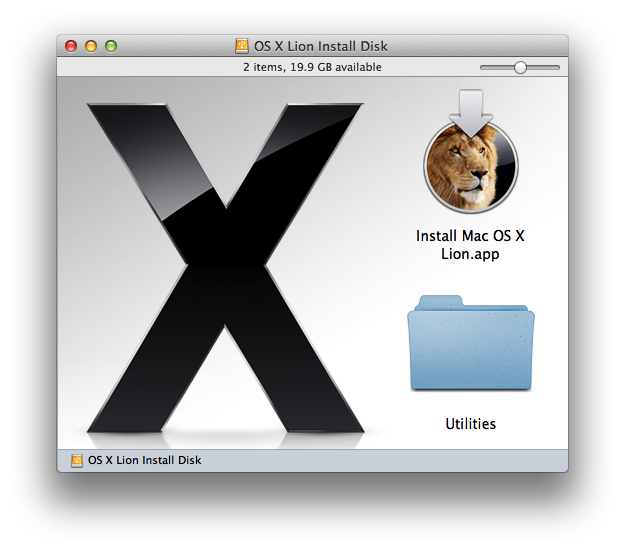
Lion DiskMaker works well, and, in fact, creates a nicer bootable drive than you get by performing the procedure manually. For example, Lion DiskMaker places the installer’s Utilities folder at the root level of your bootable drive or disc for easier access to those utilities. And the aesthetes out there will appreciate that the mounted drive is called “OS X Lion Install” and its window looks like that of an official installer, complete with the large OS X logo.

On the other hand, Lion DiskMaker does have a few glitches. For one, if you wait too long to choose an option in any of Lion DiskMaker’s dialogs, you’ll get an AppleScript time-out error, and you’ll have to start the process over. Also, if you’ve renamed the Lion installer—for example, I added (10.7.3) to the name of mine to indicate that it installs OS X 10.7.3—Lion DiskMaker will claim that the renamed app can’t be used to make a Lion-install drive. Reverting the installer’s name back to Install Mac OS X Lion.app allows Lion DiskMaker to use it.

I mentioned the beta version of Lion DiskMaker 1.7. I’m looking forward to the final version 1.7, because in addition to letting you use a partition of a drive without erasing the entire drive, Lion DiskMaker 1.7 will let you create a bootable Lion installer on a 4GB thumb drive—something the current version (as well as our manual procedure) can’t do.
[Dan Frakes (@danfrakes) is a senior editor at Macworld.]

Want to stay up to date with the latest Gems? Sign up for the Mac Gems newsletter for a weekly e-mail summary of Gems reviews sent directly to your Inbox. You can also follow Mac Gems on Twitter.

8.5.12

Google Drive vs SkyDrive vs DropBox vs iCloud: A Comparision

Google Drive vs SkyDrive vs DropBox vs iCloud: A Comparision

Google drive from Google, Sky drive from Microsoft, icloud from Apple and the world Famous Drop box are major competitors  for online storage. Though the market for drop box, icloud and Microsoft is quite stable introduction of Google drive is for sure a threat for them. If you don’t know what exactly these terms Google Drive, Sky Drive, iCloud, and Drop box means let me explain you in simple term ‘ an online storage for your files and media so that you can access from any PC, phone etc’
By default a free space is available and Instead of their free space you can upgrade your space by choosing their premium services. Let us compare the these three famous drives in each and every aspect in detail

Google Drive iCloud Sky Drive Dropbox

Google Drive icloud Sky Drive Dropbox
Free Space 5GB 5GB 7GB 2GB
Mobile Support Android, iOS (coming soon) iOS Windows Phone, iOS Android, iOS, BlackBerry
Easy of use Easy Easy- Easy Easiest
Developer Google Apple Microsoft DropBox
File Size Limit 10 GB
300 MB 300 MB for uploads via Web, No limit via Desktop
Media Streaming Not Available Available Not Available Available
Desktop Support Windows, Mac Windows, Mac Windows, Mac Windows, Mac, Linux
Developer API Yes Yes Yes Yes
Minimum Upgrade 25 GB at $2.49/month 10 GB at $20.oo/year Add 20 GB to your free storage at $10.00/year 50 GB at $9.99/month or $99.00/year (+ 1 GB per referral, up to +32 GB)

Google Drive, SkyDrive, iCloud, Dropbox are the 4 famous cloud storage devices from Google, Microsoft, Apple and dropbox set a new pavement for the cloud storing. Each one have its advantages and disadvantages when compared to other.When it comes to value services, it’s a toss-up between Dropbox and Google Drive. When you are a windows PC user and you will get  a good free space of 7GB with Sky Drive. If you own a android phone Google Drive is a perfect option. If you love apple and want to sync music/video/files with iPods, iPod and you Mac icloud rocks